
Hi all! I bought a Fluke 9110FT setup and with that setup came the SPECTRUM-TX diskettes which I now have imaged and uploaded to the "/TTL/Test_Equipment/Fluke/9100 Series" folder on John's FTP site. Inside the ZIP archive is a ReadMe with more details about the images etc. I haven't tested the images myself but I think they should probably work as the original diskettes was error free. Enjoy! /Martin! _______________________________________________ Techtoolslist mailing list Techtoolslist@flippers.com https://pairlist7.pair.net/mailman/listinfo/techtoolslist FTP site is: ftp://ttl.arcadetech.org/TTL/Test_Equipment Archive site: http://seven.pairlist.net/pipermail/techtoolslist/

Thanks for doing that Martin. I'm curious to see if the 9110 FT disk will load on a 9100FT (the 9110FT flyer says nothing about what the hw diffs are if any). Getting the PC side software working with modern Windows and a GPIB card or USB->GPIB converter could be an interesting challenge. On Tue, Jan 2, 2018 at 2:45 PM, Martin Olsson <Martin.Olsson@enfo.se> wrote:
Hi all!
I bought a Fluke 9110FT setup and with that setup came the SPECTRUM-TX diskettes which I now have imaged and uploaded to the "/TTL/Test_Equipment/Fluke/9100 Series" folder on John's FTP site.
Inside the ZIP archive is a ReadMe with more details about the images etc. I haven't tested the images myself but I think they should probably work as the original diskettes was error free.
Enjoy!
/Martin! _______________________________________________ Techtoolslist mailing list Techtoolslist@flippers.com https://pairlist7.pair.net/mailman/listinfo/techtoolslist FTP site is: ftp://ttl.arcadetech.org/TTL/Test_Equipment Archive site: http://seven.pairlist.net/pipermail/techtoolslist/
Techtoolslist mailing list Techtoolslist@flippers.com https://pairlist7.pair.net/mailman/listinfo/techtoolslist FTP site is: ftp://ttl.arcadetech.org/TTL/Test_Equipment Archive site: http://seven.pairlist.net/pipermail/techtoolslist/

Thanks Martin I do like an update on the fluke troubleshooting series. I will post an update in the next few months on the OS that might help with further hacking. Steve On Tue, 2 Jan 2018 at 14:55, Tony Jones <tony@tonyjones.com> wrote:
Thanks for doing that Martin. I'm curious to see if the 9110 FT disk will load on a 9100FT (the 9110FT flyer says nothing about what the hw diffs are if any). Getting the PC side software working with modern Windows and a GPIB card or USB->GPIB converter could be an interesting challenge.
On Tue, Jan 2, 2018 at 2:45 PM, Martin Olsson <Martin.Olsson@enfo.se> wrote:
Hi all!
I bought a Fluke 9110FT setup and with that setup came the SPECTRUM-TX diskettes which I now have imaged and uploaded to the "/TTL/Test_Equipment/Fluke/9100 Series" folder on John's FTP site.
Inside the ZIP archive is a ReadMe with more details about the images etc. I haven't tested the images myself but I think they should probably work as the original diskettes was error free.
Enjoy!
/Martin! _______________________________________________ Techtoolslist mailing list Techtoolslist@flippers.com https://pairlist7.pair.net/mailman/listinfo/techtoolslist FTP site is: ftp://ttl.arcadetech.org/TTL/Test_Equipment Archive site: http://seven.pairlist.net/pipermail/techtoolslist/
Techtoolslist mailing list Techtoolslist@flippers.com https://pairlist7.pair.net/mailman/listinfo/techtoolslist FTP site is: ftp://ttl.arcadetech.org/TTL/Test_Equipment Archive site: http://seven.pairlist.net/pipermail/techtoolslist/
_______________________________________________ Techtoolslist mailing list Techtoolslist@flippers.com https://pairlist7.pair.net/mailman/listinfo/techtoolslist FTP site is: ftp://ttl.arcadetech.org/TTL/Test_Equipment Archive site: http://seven.pairlist.net/pipermail/techtoolslist/
On Tue, Jan 2, 2018 at 2:55 PM, Tony Jones <tony@tonyjones.com> wrote:
I'm curious to see if the 9110 FT disk will load on a 9100FT (the 9110FT flyer says nothing about what the hw diffs are if any).
I scanned the 9110FT flyer. It contains a description and screenshots of Spectrum TX. It can be found here: ftp://ftp.arcadetech.org/TTL/Test_Equipment/Fluke/9100%20Series/Fluke%209110FT%20Flyer.pdf _______________________________________________ Techtoolslist mailing list Techtoolslist@flippers.com https://pairlist7.pair.net/mailman/listinfo/techtoolslist FTP site is: ftp://ttl.arcadetech.org/TTL/Test_Equipment Archive site: http://seven.pairlist.net/pipermail/techtoolslist/

Tony Jones writes:
Thanks for doing that Martin. I'm curious to see if the 9110 FT disk will load on a 9100FT (the 9110FT flyer says nothing about what the hw diffs are if any).
I doubt there’s much differece, if any. Dumping strings from the stuff on the 9110FT disk, I see a reference to "/system/model", "9105", and "9110FT." So my guess is that it refuses to run unless the model is reported as one of those. I think this is a virtual file that OS-9 exposes, based on the contents of the configuration EEPROM. I believe the service disk Unfortunately, that file isn’t accessible from TL/1, so I’m not sure what’s in it.
Getting the PC side software working with modern Windows and a GPIB card or USB->GPIB converter could be an interesting challenge.
Probably easier to run it on hardware. Or figure out what it’s sending over the GPIB and make a new version from scratch. I fired up the PC software in a VM. It tries to establish contact with the 9100 and quits if it can’t, so not much help there. The IEEE configuration utility lists all the supported GPIB cards. They’re all ISA, and seem to be $20-$60 on eBay. -- Ian _______________________________________________ Techtoolslist mailing list Techtoolslist@flippers.com https://pairlist7.pair.net/mailman/listinfo/techtoolslist FTP site is: ftp://ttl.arcadetech.org/TTL/Test_Equipment Archive site: http://seven.pairlist.net/pipermail/techtoolslist/
Ian Eure writes:
Tony Jones writes:
Thanks for doing that Martin. I'm curious to see if the 9110 FT disk will load on a 9100FT (the 9110FT flyer says nothing about what the hw diffs are if any).
I doubt there’s much differece, if any.
Dumping strings from the stuff on the 9110FT disk, I see a reference to "/system/model", "9105", and "9110FT." So my guess is that it refuses to run unless the model is reported as one of those.
I’m not sure I was right about this. The README on the PC disk discusses initialization, which happens the first time Spectrum-TX is run on the mainframe, and notes, "This process may take up to a minute to complete on a 9110FT, or longer on older 9100 series models." Which I think would be a 9100A, since I don’t think there was a 9110A. -- Ian _______________________________________________ Techtoolslist mailing list Techtoolslist@flippers.com https://pairlist7.pair.net/mailman/listinfo/techtoolslist FTP site is: ftp://ttl.arcadetech.org/TTL/Test_Equipment Archive site: http://seven.pairlist.net/pipermail/techtoolslist/
Not sure if I’m missing something or there’s something up with the FTP site, but I don’t see it there. I also don’t see the cracked V6.0 service disk or the 9100FT keyboard photos I took. Martin Olsson writes:
Hi all!
I bought a Fluke 9110FT setup and with that setup came the SPECTRUM-TX diskettes which I now have imaged and uploaded to the "/TTL/Test_Equipment/Fluke/9100 Series" folder on John's FTP site.
Inside the ZIP archive is a ReadMe with more details about the images etc. I haven't tested the images myself but I think they should probably work as the original diskettes was error free.
Enjoy!
/Martin! _______________________________________________ Techtoolslist mailing list Techtoolslist@flippers.com https://pairlist7.pair.net/mailman/listinfo/techtoolslist FTP site is: ftp://ttl.arcadetech.org/TTL/Test_Equipment Archive site: http://seven.pairlist.net/pipermail/techtoolslist/
_______________________________________________ Techtoolslist mailing list Techtoolslist@flippers.com https://pairlist7.pair.net/mailman/listinfo/techtoolslist FTP site is: ftp://ttl.arcadetech.org/TTL/Test_Equipment Archive site: http://seven.pairlist.net/pipermail/techtoolslist/
Nevermind, I figured it out. I was on ftp.flippers.com, not ttl.arcadetech.org. The former looks like an earlier incarnation of the latter. Ian Eure writes:
Not sure if I’m missing something or there’s something up with the FTP site, but I don’t see it there.
I also don’t see the cracked V6.0 service disk or the 9100FT keyboard photos I took.
Martin Olsson writes:
Hi all!
I bought a Fluke 9110FT setup and with that setup came the SPECTRUM-TX diskettes which I now have imaged and uploaded to the "/TTL/Test_Equipment/Fluke/9100 Series" folder on John's FTP site.
Inside the ZIP archive is a ReadMe with more details about the images etc. I haven't tested the images myself but I think they should probably work as the original diskettes was error free.
Enjoy!
/Martin! _______________________________________________ Techtoolslist mailing list Techtoolslist@flippers.com https://pairlist7.pair.net/mailman/listinfo/techtoolslist FTP site is: ftp://ttl.arcadetech.org/TTL/Test_Equipment Archive site: http://seven.pairlist.net/pipermail/techtoolslist/
_______________________________________________ Techtoolslist mailing list Techtoolslist@flippers.com https://pairlist7.pair.net/mailman/listinfo/techtoolslist FTP site is: ftp://ttl.arcadetech.org/TTL/Test_Equipment Archive site: http://seven.pairlist.net/pipermail/techtoolslist/
_______________________________________________ Techtoolslist mailing list Techtoolslist@flippers.com https://pairlist7.pair.net/mailman/listinfo/techtoolslist FTP site is: ftp://ttl.arcadetech.org/TTL/Test_Equipment Archive site: http://seven.pairlist.net/pipermail/techtoolslist/
Following up on this. I tried setting everything up, and got some promising signs, but haven’t been able to get it fully working. I’m dumping what I figured out in the hopes that someone else can give it a shot, or come up with some suggestions for me to try. The only 9100 with GPIB I have with actually is a 9110FT, which is perfect for this -- there shouldn’t be any issues due to using the wrong mainframe. First thing I did is set up GPIB on it. This process is kind of a hassle. 1. Boot a service disk, select CONFIGURE, and make sure IEEE is enabled. Power cycle the mainframe. 2. Install the IEEE-411 feature disk. Use the COPY function, selecing DR1 as the source and HDR as the destination. 3. Go into the setup menu, pick ON BOOT, select IEEE, select ENABLED. Hit ENTER/YES. 4. Make sure a pod is connected, then power-cycle the mainframe. 5. Go into SETUP, press MORE SOFTKEYS, and there should be a new IEEE softkey. Configure it like the SPECTRUM-TX readme.txt says: address 3, talker/listener, no terminator. 6. Install the SPECTRUM-TX software the same way as the feature disk, with COPY. 7. Run TS_INIT. From the operator’s keypad, press EXEC. If there’s a UUT name filled out, press CONT to erase it -- this selects PROGLIB instead of a UUT directory program. Then press HELP, select TS_INIT, accept the default arguments, and hit ENTER/YES. This initializes SPECTRUM-TX for the attached pod. If you change pods, you need to repeat this process. 8. Run TS_CLIFF, the same way as TS_INIT. The 9100 should say "Under PC Control (9110TX Ver. 1.0)". That’s it for the 9100 end of things. Since I don’t have another 9100 with GPIB, I don’t know if this works on a 9100 or 9105. I tried it on a 9100A just to see what happened, but it didn’t work. TS_INIT did its thing, but running TS_CLIFF errored with an "option not installed" message. I assume this is just referring to the GPIB interface, but I can’t confirm. On the PC end, I used a rackmount Pentium MMX 233mhz machine. This is the only PC I have with ISA slots. It’s a 233mhz Pentium MMX, and normally runs plain MS-DOS 6.22. I installed Windows for Workgroups 3.11 so I could try this out. I bought a National Instruments GPIB-PCII/IIA, because it seems to be supported and was the cheapest I could find on eBay ($22 shipped). The driver for this (and many other NI GPIBs) is called "NI-488.2", and version 2.6 supports Windows 3. They still host it on their website, along with nice PDF manuals, so kudos to them. The NI driver package includes a hardware self-test, which I verified was passing (after moving some other hardware around so I could allocate it an IRQ). After that, I installed SPECTRUM-TX. The installer is goofy. There are two programs, one called SETUP.EXE, for DOS, and one WSETUP.EXE for Windows. SETUP.EXE entirely doesn’t work, but WSETUP.EXE only mostly doesn’t work. They both copy a very few files to the hard disk; WSETUP also creates Program Manager icons for SPECTRUM-TX, but they all point to files on the floppy disk. I ran WSETUP.EXE, then copied everything from the floppy into the install directory and updated the Program Manager entries to point there. Okay, so all that done, cable connected, I ran TS_CLIFF on the Fluke and SPECTRUM-TX on the PC. Unfortunately, the Windows program says it can’t communicate with the Fluke. When you launch the Windows program, the Fluke display changes to "REMOTE CONTROL IN PROGRESS" -- so it received the right command from the PC. And when you hit the OK button on the PC, the Fluke resets back to the main display, so it’s got to be receiving something from the PC telling it to do that. They’re definitely talking, but something isn’t right from the PC’s perspective. Maybe it’s supposed to run off the floppy and messing around with file locations broke things? I figured this was something I could try, so I deleted the SPECTRUM-TX stuff off the hard disk and tried installing again, but WSETUP.EXE crashes now. I guess the Windows installation is balled up, but I don’t have the time to reinstall it and start over again tonight. Maybe it actually only works with an AT-GPIB card? Maybe there’s a delay loop which no longer works, because it runs 10x faster than it’s supposed to? -- Ian Martin Olsson writes:
Hi all!
I bought a Fluke 9110FT setup and with that setup came the SPECTRUM-TX diskettes which I now have imaged and uploaded to the "/TTL/Test_Equipment/Fluke/9100 Series" folder on John's FTP site.
Inside the ZIP archive is a ReadMe with more details about the images etc. I haven't tested the images myself but I think they should probably work as the original diskettes was error free.
Enjoy!
/Martin! _______________________________________________ Techtoolslist mailing list Techtoolslist@flippers.com https://pairlist7.pair.net/mailman/listinfo/techtoolslist FTP site is: ftp://ttl.arcadetech.org/TTL/Test_Equipment Archive site: http://seven.pairlist.net/pipermail/techtoolslist/
_______________________________________________ Techtoolslist mailing list Techtoolslist@flippers.com https://pairlist7.pair.net/mailman/listinfo/techtoolslist FTP site is: ftp://ttl.arcadetech.org/TTL/Test_Equipment Archive site: http://seven.pairlist.net/pipermail/techtoolslist/
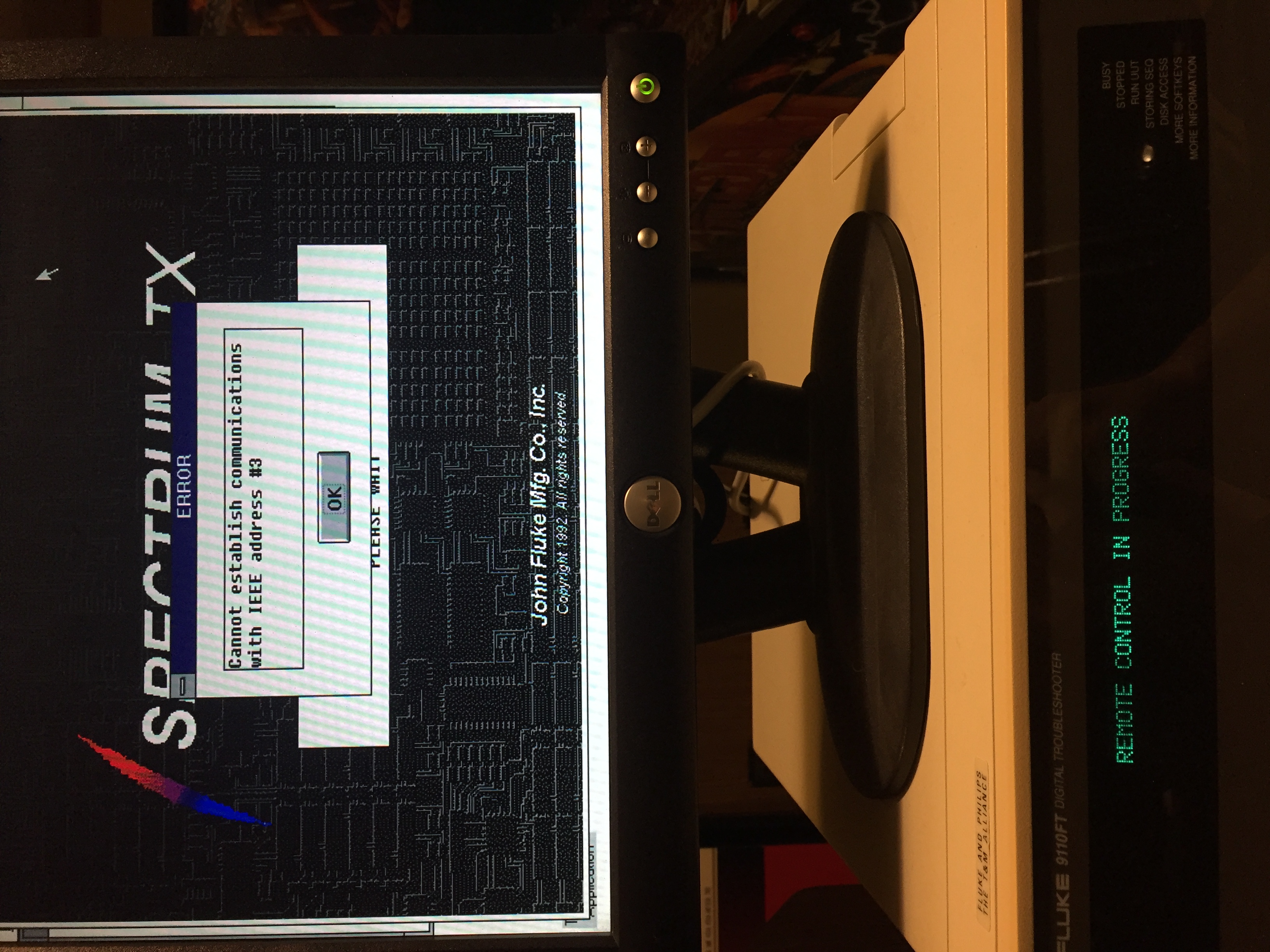

Did you verify the address of the fluke? On Jan 9, 2018 11:08 AM, "Ian Eure" <ian@retrospec.tv> wrote:
Following up on this. I tried setting everything up, and got some promising signs, but haven’t been able to get it fully working. I’m dumping what I figured out in the hopes that someone else can give it a shot, or come up with some suggestions for me to try.
The only 9100 with GPIB I have with actually is a 9110FT, which is perfect for this -- there shouldn’t be any issues due to using the wrong mainframe.
First thing I did is set up GPIB on it. This process is kind of a hassle.
1. Boot a service disk, select CONFIGURE, and make sure IEEE is enabled. Power cycle the mainframe. 2. Install the IEEE-411 feature disk. Use the COPY function, selecing DR1 as the source and HDR as the destination. 3. Go into the setup menu, pick ON BOOT, select IEEE, select ENABLED. Hit ENTER/YES. 4. Make sure a pod is connected, then power-cycle the mainframe. 5. Go into SETUP, press MORE SOFTKEYS, and there should be a new IEEE softkey. Configure it like the SPECTRUM-TX readme.txt says: address 3, talker/listener, no terminator. 6. Install the SPECTRUM-TX software the same way as the feature disk, with COPY. 7. Run TS_INIT. From the operator’s keypad, press EXEC. If there’s a UUT name filled out, press CONT to erase it -- this selects PROGLIB instead of a UUT directory program. Then press HELP, select TS_INIT, accept the default arguments, and hit ENTER/YES. This initializes SPECTRUM-TX for the attached pod. If you change pods, you need to repeat this process. 8. Run TS_CLIFF, the same way as TS_INIT. The 9100 should say "Under PC Control (9110TX Ver. 1.0)".
That’s it for the 9100 end of things.
Since I don’t have another 9100 with GPIB, I don’t know if this works on a 9100 or 9105. I tried it on a 9100A just to see what happened, but it didn’t work. TS_INIT did its thing, but running TS_CLIFF errored with an "option not installed" message. I assume this is just referring to the GPIB interface, but I can’t confirm.
On the PC end, I used a rackmount Pentium MMX 233mhz machine. This is the only PC I have with ISA slots. It’s a 233mhz Pentium MMX, and normally runs plain MS-DOS 6.22. I installed Windows for Workgroups 3.11 so I could try this out.
I bought a National Instruments GPIB-PCII/IIA, because it seems to be supported and was the cheapest I could find on eBay ($22 shipped). The driver for this (and many other NI GPIBs) is called "NI-488.2", and version 2.6 supports Windows 3. They still host it on their website, along with nice PDF manuals, so kudos to them.
The NI driver package includes a hardware self-test, which I verified was passing (after moving some other hardware around so I could allocate it an IRQ).
After that, I installed SPECTRUM-TX. The installer is goofy. There are two programs, one called SETUP.EXE, for DOS, and one WSETUP.EXE for Windows. SETUP.EXE entirely doesn’t work, but WSETUP.EXE only mostly doesn’t work. They both copy a very few files to the hard disk; WSETUP also creates Program Manager icons for SPECTRUM-TX, but they all point to files on the floppy disk. I ran WSETUP.EXE, then copied everything from the floppy into the install directory and updated the Program Manager entries to point there.
Okay, so all that done, cable connected, I ran TS_CLIFF on the Fluke and SPECTRUM-TX on the PC.
Unfortunately, the Windows program says it can’t communicate with the Fluke. When you launch the Windows program, the Fluke display changes to "REMOTE CONTROL IN PROGRESS" -- so it received the right command from the PC. And when you hit the OK button on the PC, the Fluke resets back to the main display, so it’s got to be receiving something from the PC telling it to do that. They’re definitely talking, but something isn’t right from the PC’s perspective.
Maybe it’s supposed to run off the floppy and messing around with file locations broke things? I figured this was something I could try, so I deleted the SPECTRUM-TX stuff off the hard disk and tried installing again, but WSETUP.EXE crashes now. I guess the Windows installation is balled up, but I don’t have the time to reinstall it and start over again tonight.
Maybe it actually only works with an AT-GPIB card?
Maybe there’s a delay loop which no longer works, because it runs 10x faster than it’s supposed to?
-- Ian
Martin Olsson writes:
Hi all!
I bought a Fluke 9110FT setup and with that setup came the SPECTRUM-TX diskettes which I now have imaged and uploaded to the "/TTL/Test_Equipment/Fluke/9100 Series" folder on John's FTP site.
Inside the ZIP archive is a ReadMe with more details about the images etc. I haven't tested the images myself but I think they should probably work as the original diskettes was error free.
Enjoy!
/Martin! _______________________________________________ Techtoolslist mailing list Techtoolslist@flippers.com https://pairlist7.pair.net/mailman/listinfo/techtoolslist FTP site is: ftp://ttl.arcadetech.org/TTL/Test_Equipment Archive site: http://seven.pairlist.net/pipermail/techtoolslist/
_______________________________________________ Techtoolslist mailing list Techtoolslist@flippers.com https://pairlist7.pair.net/mailman/listinfo/techtoolslist FTP site is: ftp://ttl.arcadetech.org/TTL/Test_Equipment Archive site: http://seven.pairlist.net/pipermail/techtoolslist/
_______________________________________________ Techtoolslist mailing list Techtoolslist@flippers.com https://pairlist7.pair.net/mailman/listinfo/techtoolslist FTP site is: ftp://ttl.arcadetech.org/TTL/Test_Equipment Archive site: http://seven.pairlist.net/pipermail/techtoolslist/
William Stillwell writes:
Did you verify the address of the fluke?
I set it to 3, as the SPECTRUM-TX README said. Since it enters remote control mode when I launch the PC program and leaves when I close it, I think it’s receiving commands from the PC. I haven’t worked with GPIB before, so I’m not sure if there’s something else I can do to verify this. There’s a "GPIB Spy" program in the NI driver package, which purports to monitor the bus. I ran it, but it didnt’t capture anything. Maybe it only sees things sent by other devices, not the machine it runs on? -- Ian _______________________________________________ Techtoolslist mailing list Techtoolslist@flippers.com https://pairlist7.pair.net/mailman/listinfo/techtoolslist FTP site is: ftp://ttl.arcadetech.org/TTL/Test_Equipment Archive site: http://seven.pairlist.net/pipermail/techtoolslist/
Following up again, I got it working tonight. As I suspected, it worked on a slower machine, so it’s got some sort of badly written timing loop. Maybe someone can figure out where it is and patch it so it will work on newer machines. It works on a 486DX2-66mhz at full speed, and doesn’t work on a Pentium-MMX 233mhz. Couple notes for those trying to replicate this. If you’re using an 8-bit GPIB, you can’t use DMA, or you can’t use Windows 386 Enhanced mode. I’m not sure if this limitation is from Windows, the hardware, SPECTRUM-TX, or some combination of them. The NI drivers install a control panel item, if you go in there, you can set the DMA channel to "none" -- and set up the SPECTRUM-TX configuration the same way. Or you might want to get a 16-bit card instead. I’ve been able to use WSETUP.EXE before, but it wouldn’t do anything but GPF for me this time around. I think it does that if you install the NI software before SPECTRUM-TX. I used SETUP.EXE instead, and it works much better, it actually copies the files to the HDD. You have to run it from DOS, not inside Windows. It launches Windows to finish the install. I tried to take some screenshots, but they ended up cropped for some reason. I’ll try again soon. Here’s a photo of it running: https://imgur.com/e2lUspM Mostly, this lets you do the same things as you can from the operator keyboard. Maybe it was more convenient to use a PC for this in 1991, but since you need such an old machine for it to work, I’m not sure how useful it is in 2018. It has some intriguing features which I’d like to dig into more. One is "sequence file," which seems to let you upload a series of commands from the PC to run on the mainframe. I’m not sure if this is just scripting the SPECTRUM-TX commands or what. The other thing is that you can send TL/1 statements from the PC and get the return value back. That’s interesting, because normally you’d need the programmer station option to run TL/1 code. And even if you do, this is something that’s impossible from inside a TL/1 program. Figuring out how this works is potentially interesting for writing non-TL/1 programs for the 9100 (ex. in C or C++). -- Ian Ian Eure writes:
Following up on this. I tried setting everything up, and got some promising signs, but haven’t been able to get it fully working. I’m dumping what I figured out in the hopes that someone else can give it a shot, or come up with some suggestions for me to try.
The only 9100 with GPIB I have with actually is a 9110FT, which is perfect for this -- there shouldn’t be any issues due to using the wrong mainframe.
First thing I did is set up GPIB on it. This process is kind of a hassle.
1. Boot a service disk, select CONFIGURE, and make sure IEEE is enabled. Power cycle the mainframe. 2. Install the IEEE-411 feature disk. Use the COPY function, selecing DR1 as the source and HDR as the destination. 3. Go into the setup menu, pick ON BOOT, select IEEE, select ENABLED. Hit ENTER/YES. 4. Make sure a pod is connected, then power-cycle the mainframe. 5. Go into SETUP, press MORE SOFTKEYS, and there should be a new IEEE softkey. Configure it like the SPECTRUM-TX readme.txt says: address 3, talker/listener, no terminator. 6. Install the SPECTRUM-TX software the same way as the feature disk, with COPY. 7. Run TS_INIT. From the operator’s keypad, press EXEC. If there’s a UUT name filled out, press CONT to erase it -- this selects PROGLIB instead of a UUT directory program. Then press HELP, select TS_INIT, accept the default arguments, and hit ENTER/YES. This initializes SPECTRUM-TX for the attached pod. If you change pods, you need to repeat this process. 8. Run TS_CLIFF, the same way as TS_INIT. The 9100 should say "Under PC Control (9110TX Ver. 1.0)".
That’s it for the 9100 end of things.
Since I don’t have another 9100 with GPIB, I don’t know if this works on a 9100 or 9105. I tried it on a 9100A just to see what happened, but it didn’t work. TS_INIT did its thing, but running TS_CLIFF errored with an "option not installed" message. I assume this is just referring to the GPIB interface, but I can’t confirm.
On the PC end, I used a rackmount Pentium MMX 233mhz machine. This is the only PC I have with ISA slots. It’s a 233mhz Pentium MMX, and normally runs plain MS-DOS 6.22. I installed Windows for Workgroups 3.11 so I could try this out.
I bought a National Instruments GPIB-PCII/IIA, because it seems to be supported and was the cheapest I could find on eBay ($22 shipped). The driver for this (and many other NI GPIBs) is called "NI-488.2", and version 2.6 supports Windows 3. They still host it on their website, along with nice PDF manuals, so kudos to them.
The NI driver package includes a hardware self-test, which I verified was passing (after moving some other hardware around so I could allocate it an IRQ).
After that, I installed SPECTRUM-TX. The installer is goofy. There are two programs, one called SETUP.EXE, for DOS, and one WSETUP.EXE for Windows. SETUP.EXE entirely doesn’t work, but WSETUP.EXE only mostly doesn’t work. They both copy a very few files to the hard disk; WSETUP also creates Program Manager icons for SPECTRUM-TX, but they all point to files on the floppy disk. I ran WSETUP.EXE, then copied everything from the floppy into the install directory and updated the Program Manager entries to point there.
Okay, so all that done, cable connected, I ran TS_CLIFF on the Fluke and SPECTRUM-TX on the PC.
Unfortunately, the Windows program says it can’t communicate with the Fluke. When you launch the Windows program, the Fluke display changes to "REMOTE CONTROL IN PROGRESS" -- so it received the right command from the PC. And when you hit the OK button on the PC, the Fluke resets back to the main display, so it’s got to be receiving something from the PC telling it to do that. They’re definitely talking, but something isn’t right from the PC’s perspective.
Maybe it’s supposed to run off the floppy and messing around with file locations broke things? I figured this was something I could try, so I deleted the SPECTRUM-TX stuff off the hard disk and tried installing again, but WSETUP.EXE crashes now. I guess the Windows installation is balled up, but I don’t have the time to reinstall it and start over again tonight.
Maybe it actually only works with an AT-GPIB card?
Maybe there’s a delay loop which no longer works, because it runs 10x faster than it’s supposed to?
-- Ian
Martin Olsson writes:
Hi all!
I bought a Fluke 9110FT setup and with that setup came the SPECTRUM-TX diskettes which I now have imaged and uploaded to the "/TTL/Test_Equipment/Fluke/9100 Series" folder on John's FTP site.
Inside the ZIP archive is a ReadMe with more details about the images etc. I haven't tested the images myself but I think they should probably work as the original diskettes was error free.
Enjoy!
/Martin! _______________________________________________ Techtoolslist mailing list Techtoolslist@flippers.com https://pairlist7.pair.net/mailman/listinfo/techtoolslist FTP site is: ftp://ttl.arcadetech.org/TTL/Test_Equipment Archive site: http://seven.pairlist.net/pipermail/techtoolslist/
_______________________________________________ Techtoolslist mailing list Techtoolslist@flippers.com https://pairlist7.pair.net/mailman/listinfo/techtoolslist FTP site is: ftp://ttl.arcadetech.org/TTL/Test_Equipment Archive site: http://seven.pairlist.net/pipermail/techtoolslist/
_______________________________________________ Techtoolslist mailing list Techtoolslist@flippers.com https://pairlist7.pair.net/mailman/listinfo/techtoolslist FTP site is: ftp://ttl.arcadetech.org/TTL/Test_Equipment Archive site: http://seven.pairlist.net/pipermail/techtoolslist/

On 2018/01/27 6:03 p.m., Ian Eure wrote:
Following up again, I got it working tonight. As I suspected, it worked on a slower machine, so it’s got some sort of badly written timing loop. Maybe someone can figure out where it is and patch it so it will work on newer machines. It works on a 486DX2-66mhz at full speed, and doesn’t work on a Pentium-MMX 233mhz.
Couple notes for those trying to replicate this.
If you’re using an 8-bit GPIB, you can’t use DMA, or you can’t use Windows 386 Enhanced mode. I’m not sure if this limitation is from Windows, the hardware, SPECTRUM-TX, or some combination of them. The NI drivers install a control panel item, if you go in there, you can set the DMA channel to "none" -- and set up the SPECTRUM-TX configuration the same way. Or you might want to get a 16-bit card instead.
I’ve been able to use WSETUP.EXE before, but it wouldn’t do anything but GPF for me this time around. I think it does that if you install the NI software before SPECTRUM-TX. I used SETUP.EXE instead, and it works much better, it actually copies the files to the HDD. You have to run it from DOS, not inside Windows. It launches Windows to finish the install.
I tried to take some screenshots, but they ended up cropped for some reason. I’ll try again soon. Here’s a photo of it running: https://imgur.com/e2lUspM
Mostly, this lets you do the same things as you can from the operator keyboard. Maybe it was more convenient to use a PC for this in 1991, but since you need such an old machine for it to work, I’m not sure how useful it is in 2018.
It has some intriguing features which I’d like to dig into more. One is "sequence file," which seems to let you upload a series of commands from the PC to run on the mainframe. I’m not sure if this is just scripting the SPECTRUM-TX commands or what.
The other thing is that you can send TL/1 statements from the PC and get the return value back. That’s interesting, because normally you’d need the programmer station option to run TL/1 code. And even if you do, this is something that’s impossible from inside a TL/1 program. Figuring out how this works is potentially interesting for writing non-TL/1 programs for the 9100 (ex. in C or C++).
-- Ian
Did you ever get any further with this Ian? 5 years isn't long on TTL - I was thinking of poking at the Spectrum-TX but not so sure now that it is worth the time after reading your notes... Thanks! John :-#)#
Ian Eure writes:
Following up on this. I tried setting everything up, and got some promising signs, but haven’t been able to get it fully working. I’m dumping what I figured out in the hopes that someone else can give it a shot, or come up with some suggestions for me to try.
The only 9100 with GPIB I have with actually is a 9110FT, which is perfect for this -- there shouldn’t be any issues due to using the wrong mainframe.
First thing I did is set up GPIB on it. This process is kind of a hassle.
1. Boot a service disk, select CONFIGURE, and make sure IEEE is enabled. Power cycle the mainframe. 2. Install the IEEE-411 feature disk. Use the COPY function, selecing DR1 as the source and HDR as the destination. 3. Go into the setup menu, pick ON BOOT, select IEEE, select ENABLED. Hit ENTER/YES. 4. Make sure a pod is connected, then power-cycle the mainframe. 5. Go into SETUP, press MORE SOFTKEYS, and there should be a new IEEE softkey. Configure it like the SPECTRUM-TX readme.txt says: address 3, talker/listener, no terminator. 6. Install the SPECTRUM-TX software the same way as the feature disk, with COPY. 7. Run TS_INIT. From the operator’s keypad, press EXEC. If there’s a UUT name filled out, press CONT to erase it -- this selects PROGLIB instead of a UUT directory program. Then press HELP, select TS_INIT, accept the default arguments, and hit ENTER/YES. This initializes SPECTRUM-TX for the attached pod. If you change pods, you need to repeat this process. 8. Run TS_CLIFF, the same way as TS_INIT. The 9100 should say "Under PC Control (9110TX Ver. 1.0)".
That’s it for the 9100 end of things.
Since I don’t have another 9100 with GPIB, I don’t know if this works on a 9100 or 9105. I tried it on a 9100A just to see what happened, but it didn’t work. TS_INIT did its thing, but running TS_CLIFF errored with an "option not installed" message. I assume this is just referring to the GPIB interface, but I can’t confirm.
On the PC end, I used a rackmount Pentium MMX 233mhz machine. This is the only PC I have with ISA slots. It’s a 233mhz Pentium MMX, and normally runs plain MS-DOS 6.22. I installed Windows for Workgroups 3.11 so I could try this out.
I bought a National Instruments GPIB-PCII/IIA, because it seems to be supported and was the cheapest I could find on eBay ($22 shipped). The driver for this (and many other NI GPIBs) is called "NI-488.2", and version 2.6 supports Windows 3. They still host it on their website, along with nice PDF manuals, so kudos to them.
The NI driver package includes a hardware self-test, which I verified was passing (after moving some other hardware around so I could allocate it an IRQ).
After that, I installed SPECTRUM-TX. The installer is goofy. There are two programs, one called SETUP.EXE, for DOS, and one WSETUP.EXE for Windows. SETUP.EXE entirely doesn’t work, but WSETUP.EXE only mostly doesn’t work. They both copy a very few files to the hard disk; WSETUP also creates Program Manager icons for SPECTRUM-TX, but they all point to files on the floppy disk. I ran WSETUP.EXE, then copied everything from the floppy into the install directory and updated the Program Manager entries to point there.
Okay, so all that done, cable connected, I ran TS_CLIFF on the Fluke and SPECTRUM-TX on the PC.
Unfortunately, the Windows program says it can’t communicate with the Fluke. When you launch the Windows program, the Fluke display changes to "REMOTE CONTROL IN PROGRESS" -- so it received the right command from the PC. And when you hit the OK button on the PC, the Fluke resets back to the main display, so it’s got to be receiving something from the PC telling it to do that. They’re definitely talking, but something isn’t right from the PC’s perspective.
Maybe it’s supposed to run off the floppy and messing around with file locations broke things? I figured this was something I could try, so I deleted the SPECTRUM-TX stuff off the hard disk and tried installing again, but WSETUP.EXE crashes now. I guess the Windows installation is balled up, but I don’t have the time to reinstall it and start over again tonight.
Maybe it actually only works with an AT-GPIB card?
Maybe there’s a delay loop which no longer works, because it runs 10x faster than it’s supposed to?
-- Ian
Martin Olsson writes:
Hi all!
I bought a Fluke 9110FT setup and with that setup came the SPECTRUM-TX diskettes which I now have imaged and uploaded to the "/TTL/Test_Equipment/Fluke/9100 Series" folder on John's FTP site.
Inside the ZIP archive is a ReadMe with more details about the images etc. I haven't tested the images myself but I think they should probably work as the original diskettes was error free.
Enjoy!
/Martin!
-- John's Jukes Ltd. 7 - 3979 Marine Way, Burnaby, BC, Canada V5J 5E3 Call (604)872-5757 (Pinballs, Jukes, Video Games) flippers.com "Old pinballers never die, they just flip out" _______________________________________________ Techtoolslist mailing list Techtoolslist@flippers.com https://pairlist7.pair.net/mailman/listinfo/techtoolslist FTP site is: ftp://ftp.flippers.com/TTL/TestEquipment Archive site: http://seven.pairlist.net/pipermail/techtoolslist/
Following up on this. I tried setting everything up, and got some promising signs, but haven’t been able to get it fully working. I’m dumping what I figured out in the hopes that someone else can give it a shot, or come up with some suggestions for me to try. The only 9100 with GPIB I have with actually is a 9110FT, which is perfect for this -- there shouldn’t be any issues due to using the wrong mainframe. First thing I did is set up GPIB on it. This process is kind of a hassle. 1. Boot a service disk, select CONFIGURE, and make sure IEEE is enabled. Power cycle the mainframe. 2. Install the IEEE-411 feature disk. Use the COPY function, selecing DR1 as the source and HDR as the destination. 3. Go into the setup menu, pick ON BOOT, select IEEE, select ENABLED. Hit ENTER/YES. 4. Make sure a pod is connected, then power-cycle the mainframe. 5. Go into SETUP, press MORE SOFTKEYS, and there should be a new IEEE softkey. Configure it like the SPECTRUM-TX readme.txt says: address 3, talker/listener, no terminator. 6. Install the SPECTRUM-TX software the same way as the feature disk, with COPY. 7. Run TS_INIT. From the operator’s keypad, press EXEC. If there’s a UUT name filled out, press CONT to erase it -- this selects PROGLIB instead of a UUT directory program. Then press HELP, select TS_INIT, accept the default arguments, and hit ENTER/YES. This initializes SPECTRUM-TX for the attached pod. If you change pods, you need to repeat this process. 8. Run TS_CLIFF, the same way as TS_INIT. The 9100 should say "Under PC Control (9110TX Ver. 1.0)". That’s it for the 9100 end of things. Since I don’t have another 9100 with GPIB, I don’t know if this works on a 9100 or 9105. I tried it on a 9100A just to see what happened, but it didn’t work. TS_INIT did its thing, but running TS_CLIFF errored with an "option not installed" message. I assume this is just referring to the GPIB interface, but I can’t confirm. On the PC end, I used a rackmount Pentium MMX 233mhz machine. This is the only PC I have with ISA slots. It’s a 233mhz Pentium MMX, and normally runs plain MS-DOS 6.22. I installed Windows for Workgroups 3.11 so I could try this out. I bought a National Instruments GPIB-PCII/IIA, because it seems to be supported and was the cheapest I could find on eBay ($22 shipped). The driver for this (and many other NI GPIBs) is called "NI-488.2", and version 2.6 supports Windows 3. They still host it on their website, along with nice PDF manuals, so kudos to them. The NI driver package includes a hardware self-test, which I verified was passing (after moving some other hardware around so I could allocate it an IRQ). After that, I installed SPECTRUM-TX. The installer is goofy. There are two programs, one called SETUP.EXE, for DOS, and one WSETUP.EXE for Windows. SETUP.EXE entirely doesn’t work, but WSETUP.EXE only mostly doesn’t work. They both copy a very few files to the hard disk; WSETUP also creates Program Manager icons for SPECTRUM-TX, but they all point to files on the floppy disk. I ran WSETUP.EXE, then copied everything from the floppy into the install directory and updated the Program Manager entries to point there. Okay, so all that done, cable connected, I ran TS_CLIFF on the Fluke and SPECTRUM-TX on the PC. Unfortunately, the Windows program says it can’t communicate with the Fluke. When you launch the Windows program, the Fluke display changes to "REMOTE CONTROL IN PROGRESS" -- so it received the right command from the PC. And when you hit the OK button on the PC, the Fluke resets back to the main display, so it’s got to be receiving something from the PC telling it to do that. They’re definitely talking, but something isn’t right from the PC’s perspective. Here’s what I was seeing: https://imgur.com/a/yEKmR Maybe it’s supposed to run off the floppy and messing around with file locations broke things? I figured this was something I could try, so I deleted the SPECTRUM-TX stuff off the hard disk and tried installing again, but WSETUP.EXE crashes now. I guess the Windows installation is balled up, but I don’t have the time to reinstall it and start over again tonight. Maybe it actually only works with an AT-GPIB card? Maybe there’s a delay loop which no longer works, because it runs 10x faster than it’s supposed to? -- Ian Martin Olsson writes:
Hi all!
I bought a Fluke 9110FT setup and with that setup came the SPECTRUM-TX diskettes which I now have imaged and uploaded to the "/TTL/Test_Equipment/Fluke/9100 Series" folder on John's FTP site.
Inside the ZIP archive is a ReadMe with more details about the images etc. I haven't tested the images myself but I think they should probably work as the original diskettes was error free.
Enjoy!
/Martin! _______________________________________________ Techtoolslist mailing list Techtoolslist@flippers.com https://pairlist7.pair.net/mailman/listinfo/techtoolslist FTP site is: ftp://ttl.arcadetech.org/TTL/Test_Equipment Archive site: http://seven.pairlist.net/pipermail/techtoolslist/
_______________________________________________ Techtoolslist mailing list Techtoolslist@flippers.com https://pairlist7.pair.net/mailman/listinfo/techtoolslist FTP site is: ftp://ttl.arcadetech.org/TTL/Test_Equipment Archive site: http://seven.pairlist.net/pipermail/techtoolslist/
Just want to add that I did a quick test installation on a VM and it seemed to install correctly when I started SETUP.EXE from the diskette prior to loading Windows. /Martin! -----Original Message----- From: Techtoolslist [mailto:techtoolslist-bounces@flippers.com] On Behalf Of Ian Eure Sent: den 9 januari 2018 16:07 To: Technical Tools Mail List <techtoolslist@flippers.com> Subject: Re: [Techtoolslist] Fluke 9110FT SPECTRUM-TX diskettes imaged Following up on this. I tried setting everything up, and got some promising signs, but haven’t been able to get it fully working. I’m dumping what I figured out in the hopes that someone else can give it a shot, or come up with some suggestions for me to try. The only 9100 with GPIB I have with actually is a 9110FT, which is perfect for this -- there shouldn’t be any issues due to using the wrong mainframe. First thing I did is set up GPIB on it. This process is kind of a hassle. 1. Boot a service disk, select CONFIGURE, and make sure IEEE is enabled. Power cycle the mainframe. 2. Install the IEEE-411 feature disk. Use the COPY function, selecing DR1 as the source and HDR as the destination. 3. Go into the setup menu, pick ON BOOT, select IEEE, select ENABLED. Hit ENTER/YES. 4. Make sure a pod is connected, then power-cycle the mainframe. 5. Go into SETUP, press MORE SOFTKEYS, and there should be a new IEEE softkey. Configure it like the SPECTRUM-TX readme.txt says: address 3, talker/listener, no terminator. 6. Install the SPECTRUM-TX software the same way as the feature disk, with COPY. 7. Run TS_INIT. From the operator’s keypad, press EXEC. If there’s a UUT name filled out, press CONT to erase it -- this selects PROGLIB instead of a UUT directory program. Then press HELP, select TS_INIT, accept the default arguments, and hit ENTER/YES. This initializes SPECTRUM-TX for the attached pod. If you change pods, you need to repeat this process. 8. Run TS_CLIFF, the same way as TS_INIT. The 9100 should say "Under PC Control (9110TX Ver. 1.0)". That’s it for the 9100 end of things. Since I don’t have another 9100 with GPIB, I don’t know if this works on a 9100 or 9105. I tried it on a 9100A just to see what happened, but it didn’t work. TS_INIT did its thing, but running TS_CLIFF errored with an "option not installed" message. I assume this is just referring to the GPIB interface, but I can’t confirm. On the PC end, I used a rackmount Pentium MMX 233mhz machine. This is the only PC I have with ISA slots. It’s a 233mhz Pentium MMX, and normally runs plain MS-DOS 6.22. I installed Windows for Workgroups 3.11 so I could try this out. I bought a National Instruments GPIB-PCII/IIA, because it seems to be supported and was the cheapest I could find on eBay ($22 shipped). The driver for this (and many other NI GPIBs) is called "NI-488.2", and version 2.6 supports Windows 3. They still host it on their website, along with nice PDF manuals, so kudos to them. The NI driver package includes a hardware self-test, which I verified was passing (after moving some other hardware around so I could allocate it an IRQ). After that, I installed SPECTRUM-TX. The installer is goofy. There are two programs, one called SETUP.EXE, for DOS, and one WSETUP.EXE for Windows. SETUP.EXE entirely doesn’t work, but WSETUP.EXE only mostly doesn’t work. They both copy a very few files to the hard disk; WSETUP also creates Program Manager icons for SPECTRUM-TX, but they all point to files on the floppy disk. I ran WSETUP.EXE, then copied everything from the floppy into the install directory and updated the Program Manager entries to point there. Okay, so all that done, cable connected, I ran TS_CLIFF on the Fluke and SPECTRUM-TX on the PC. Unfortunately, the Windows program says it can’t communicate with the Fluke. When you launch the Windows program, the Fluke display changes to "REMOTE CONTROL IN PROGRESS" -- so it received the right command from the PC. And when you hit the OK button on the PC, the Fluke resets back to the main display, so it’s got to be receiving something from the PC telling it to do that. They’re definitely talking, but something isn’t right from the PC’s perspective. Here’s what I was seeing: https://imgur.com/a/yEKmR Maybe it’s supposed to run off the floppy and messing around with file locations broke things? I figured this was something I could try, so I deleted the SPECTRUM-TX stuff off the hard disk and tried installing again, but WSETUP.EXE crashes now. I guess the Windows installation is balled up, but I don’t have the time to reinstall it and start over again tonight. Maybe it actually only works with an AT-GPIB card? Maybe there’s a delay loop which no longer works, because it runs 10x faster than it’s supposed to? -- Ian Martin Olsson writes:
Hi all!
I bought a Fluke 9110FT setup and with that setup came the SPECTRUM-TX diskettes which I now have imaged and uploaded to the "/TTL/Test_Equipment/Fluke/9100 Series" folder on John's FTP site.
Inside the ZIP archive is a ReadMe with more details about the images etc. I haven't tested the images myself but I think they should probably work as the original diskettes was error free.
Enjoy!
/Martin! _______________________________________________ Techtoolslist mailing list Techtoolslist@flippers.com https://pairlist7.pair.net/mailman/listinfo/techtoolslist FTP site is: ftp://ttl.arcadetech.org/TTL/Test_Equipment Archive site: http://seven.pairlist.net/pipermail/techtoolslist/
_______________________________________________ Techtoolslist mailing list Techtoolslist@flippers.com https://pairlist7.pair.net/mailman/listinfo/techtoolslist FTP site is: ftp://ttl.arcadetech.org/TTL/Test_Equipment Archive site: http://seven.pairlist.net/pipermail/techtoolslist/ _______________________________________________ Techtoolslist mailing list Techtoolslist@flippers.com https://pairlist7.pair.net/mailman/listinfo/techtoolslist FTP site is: ftp://ttl.arcadetech.org/TTL/Test_Equipment Archive site: http://seven.pairlist.net/pipermail/techtoolslist/
participants (6)
-
 Ian Eure
 -
 John Robertson via Techtoolslist
 -
 Martin Olsson
 -
 Steve Larkins
 -
 Tony Jones
 -
 William Stillwell